How to get online shopping coupons and instant cashback easily ?
When you shop on Amazon or Flipkart, you’re probably getting a deal. But are you getting the deal on top of the deal?
That’s the core idea behind CashKaro — India’s largest cashback platform. You shop through CashKaro instead of going directly to the retailer. CashKaro earns a referral commission from the retailer. CashKaro gives most of that commission back to you as cashback. You pay the same price. You get money back on top.
It’s a simple model. But behind that simplicity is one of India’s most interesting growth stories in affiliate commerce — a company that went from a startup idea in 2013 to ₹600 crore in annual revenue in FY26, growing at 72% year-over-year, while driving ₹10,000 crore in annual sales to partner brands.
This post covers both sides of CashKaro: how to use it to save money on your own purchases, and what the business model behind it teaches Indian founders about affiliate marketing, cashback commerce, and performance-led growth.
What is CashKaro?
CashKaro is India’s largest cashback and coupon platform, covering over 1,500 online retailers including Amazon, Flipkart, Myntra, AJIO, Swiggy, and more. Founded in 2013 by Rohan and Swati Bhargava, it is headquartered in Gurugram and has raised $32.5 million in funding from investors including the late Ratan Tata and Kalaari Capital.
The model: when you click through to a retailer’s product page via CashKaro and complete a purchase, CashKaro earns an affiliate commission from that retailer. It then passes the majority of that commission to your CashKaro account as real cashback — transferable directly to your bank account. You’re not earning points, vouchers, or credits that expire. You’re earning money.
Beyond cashback, CashKaro also functions as a price comparison tool — showing you the same product listed across multiple retailers alongside their respective cashback offers, so you can make an informed call on where to buy based on effective price (listed price minus cashback).
The platform is available as a website and as an app on Android and iOS, with over 17 million registered users as of 2025.
CashKaro’s Business Model — The Affiliate Machine Behind the Cashback
Understanding how CashKaro makes money is genuinely useful — both for using the platform effectively and for understanding a replicable growth model that Indian founders can apply in their own businesses.
The core mechanics are straightforward:
Step 1: CashKaro partners with 1,500+ online retailers as an affiliate. Each retailer agrees to pay CashKaro a commission — typically 2–15% of sale value depending on the category — for every purchase that originates from a CashKaro click.
Step 2: CashKaro passes the majority of this commission back to the user as cashback. The exact split varies by retailer and product category, but the user consistently gets the larger share.
Step 3: CashKaro retains a smaller portion of the commission as its own revenue. It also earns from premium placement advertising — brands pay for featured positions within the CashKaro platform to increase their visibility to CashKaro’s user base.
The result is a three-way value exchange: retailers acquire customers and sales through a performance-based channel (they only pay when a sale happens — no wasted ad spend), users get real money back on purchases they were making anyway, and CashKaro earns revenue from the margin between the two.
This is affiliate marketing at scale — and it’s the same model that powers some of the largest media businesses in the world, from Amazon Associates to the New York Times’ Wirecutter. CashKaro simply applied it specifically to the Indian ecommerce market, built a consumer brand around the cashback angle, and scaled it to ₹600 crore in revenue.
Key Features of CashKaro
One-Click Cashback Process
In most cases, getting cashback through CashKaro is a single-click process. Find your product on CashKaro, click through to the retailer’s page, complete your order as usual, and the cashback is tracked and credited automatically — no coupon codes to copy-paste, no forms to fill, no manual claim process.
1,500+ Retailers Covered
CashKaro covers retailers across electronics, fashion, travel, food delivery, health, and more. If you shop regularly across multiple platforms, most of them are almost certainly listed with active cashback rates.
Built-In Price Comparison
For any given product, CashKaro shows you which retailers stock it and what cashback each one is offering. This lets you compare effective prices — listed price minus cashback — across platforms before deciding where to buy. It’s a genuinely useful feature that most shoppers overlook.
Bank Transfer Withdrawals
Unlike many reward programmes that lock earnings into platform credits or vouchers, CashKaro cashback is transferable directly to your bank account once the minimum withdrawal threshold is met and the retailer’s return window has passed. Real money, not points.
EarnKaro — The Affiliate Layer
CashKaro’s sister platform EarnKaro extends the same affiliate model to content creators and influencers. Where CashKaro earns you cashback on your own purchases, EarnKaro lets you share affiliate links with an audience and earn commissions on every purchase made through those links — without buying anything yourself. EarnKaro is currently India’s number one affiliate platform by ecommerce traffic generation, with top creators earning up to ₹40 lakhs per month.
How to Use CashKaro — Step by Step
-
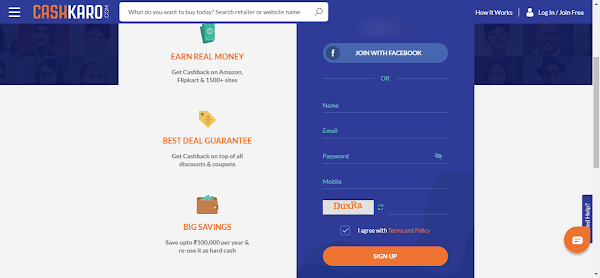
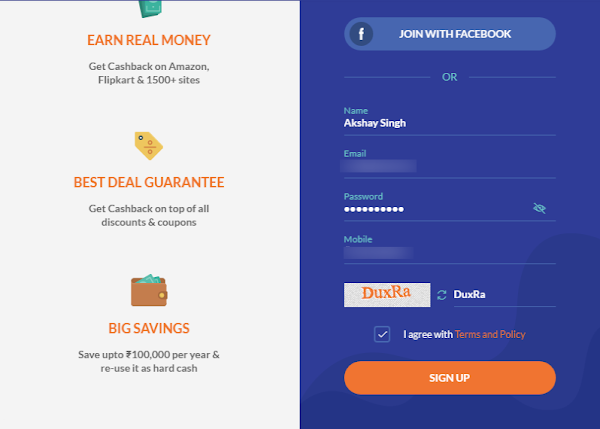
Visit CashKaro.com and create a free account — sign up with your name, email, and mobile number, or use your Facebook account.
-
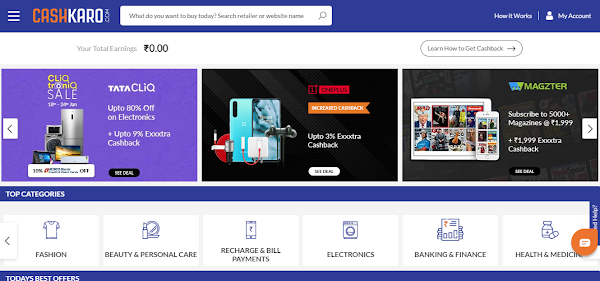
Once signed in, you’ll land on the CashKaro dashboard — deals, featured retailers, and a search bar.
-
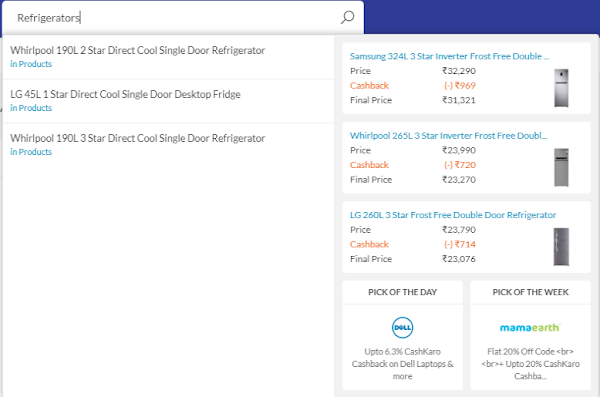
Search for the product you want to buy.
-
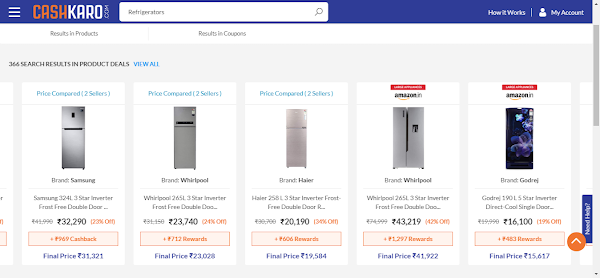
Browse the results and select your product.
-
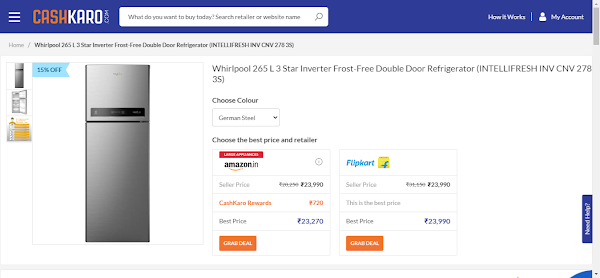
On the product page, you’ll see the item listed across multiple retailers with their cashback offers. Compare effective prices and pick the best deal.
-
Click on your preferred retailer’s option. You’ll be redirected to that product’s page on the retailer’s website.
-
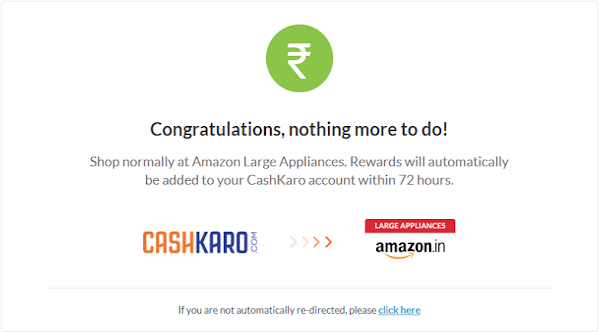
Complete your purchase on the retailer’s site exactly as normal.
-
The cashback is tracked and credited to your CashKaro wallet automatically — typically within a few days of order confirmation.
-
Once your cashback crosses the minimum withdrawal threshold and the retailer’s return window has passed, transfer it directly to your bank account.
How to Earn from CashKaro — Not Just Save
Most people use CashKaro as a savings tool. But there are two ways to use it as an earning tool:
The informal approach: If someone around you — a family member, colleague, neighbour — needs to buy something online, place the order on their behalf through CashKaro. They get the product at the same price they’d pay anywhere else. You get the cashback in your account. On high-value purchases like electronics or appliances, this can add up to meaningful amounts for a few minutes of effort.
The formal approach — EarnKaro: CashKaro’s affiliate platform EarnKaro lets you generate unique affiliate links for any product on any partner retailer. Share those links with your audience — on WhatsApp, Instagram, YouTube, a blog, anywhere — and earn a commission on every purchase made through your link. You don’t need to buy anything. You don’t need a large audience. India’s top EarnKaro creators earn up to ₹40 lakhs per month, but even smaller creators with engaged niche audiences earn consistently through the model.
CashKaro also has a referral programme — refer a friend who signs up and shops, and you earn additional cashback on their purchases for a period, compounding your earning potential further.
Frequently Asked Questions
Q: Is CashKaro legitimate and safe to use?
A: Yes. CashKaro is one of India’s most established cashback platforms — founded in 2013, backed by the late Ratan Tata and Kalaari Capital, with over 17 million registered users and ₹600 crore in annual revenue (FY26). It operates on a standard affiliate marketing model used widely across the industry globally.
Q: How does CashKaro make money?
A: CashKaro earns affiliate commissions from retailers when users click through and purchase. It passes the majority of this commission back to users as cashback and retains a smaller portion as revenue. Additional revenue comes from premium placement advertising by partner brands within the CashKaro platform.
Q: How long does CashKaro take to credit cashback?
A: Cashback is tracked and credited to your CashKaro wallet within a few days of order confirmation. It becomes withdrawable to your bank account once the retailer’s return window has passed — typically 30 to 90 days depending on the retailer and product category.
Q: What is EarnKaro and how is it different from CashKaro?
A: EarnKaro is CashKaro’s affiliate marketing platform for content creators. Where CashKaro gives you cashback on your own purchases, EarnKaro lets you share affiliate links with an audience and earn commissions on sales generated through those links. EarnKaro is India’s number one affiliate platform by ecommerce traffic generation, with top creators earning up to ₹40 lakhs per month.
Q: Can I use CashKaro on my phone?
A: Yes — CashKaro has dedicated apps for Android and iOS with the same features as the website.
Conclusion
CashKaro is one of those tools that costs nothing to set up and pays you back passively every time you use it. The concept is simple, the process takes less than a minute once you’ve signed up, and the savings stack on top of whatever deals the retailer is already running.
But beyond the consumer utility, CashKaro is worth studying for what it demonstrates about affiliate-led growth in India: a capital-efficient model that aligns incentives between retailers, users, and the platform — growing at 72% year-over-year to ₹600 crore without the unsustainable unit economics that have sunk other Indian consumer internet businesses.
Give it a try on your next purchase. And if you’re thinking about affiliate mechanics for your own startup, the model is worth studying closely.
Building a startup in India? CashKaro’s model is a masterclass in affiliate-led growth.
CashKaro grew to ₹600 crore in revenue without a large paid acquisition budget — by building a performance marketing model where every rupee spent on cashback drives a sale. The mechanics — affiliate commissions, cashback incentives, referral compounding, and EarnKaro’s creator network — are all replicable at different scales.
Indian startups in ecommerce, D2C, and consumer internet are increasingly turning to affiliate marketing as customer acquisition costs on Meta and Google continue to rise. We’ve put together a practical guide on how to build an affiliate marketing programme for your Indian startup — the platform options, commission structures, creator partnerships, and compliance considerations under India’s evolving digital commerce regulations.
Related Articles
Read next

How to perform Google Image Search
You’ve probably used Google Image Search dozens of times without knowing half of what it can do. Most people treat […]
Read More
What is Textra? A Complete Guide to Textra App
Your default SMS app works. But “works” is a low bar. Textra SMS is what happens when a developer spends […]
Read More
How to Resize an Image in GIMP
Got an image that’s too large to upload, or too small to print properly? Whether you’re prepping visuals for a […]
Read More