What Everybody Ought to Know About Online Shopping
Online shopping has become second nature for most of us — but here’s a question worth asking: are you actually getting the most out of it?
India is now one of the world’s largest ecommerce markets, with platforms like Amazon and Flipkart processing millions of orders daily. Most shoppers have the basics down — search, compare, buy. But the platforms are significantly more powerful than most people give them credit for. Features that could save you hours of browsing time and hundreds of rupees per purchase go completely unused by the average user.
Here are six of those features — what they are, how they work, and how to use them to your advantage.
Note: Screenshots in this article are from Amazon.in for illustrative reference. The features discussed apply broadly across most major e-commerce platforms.
1. The Sorting Feature — Stop Browsing by Default
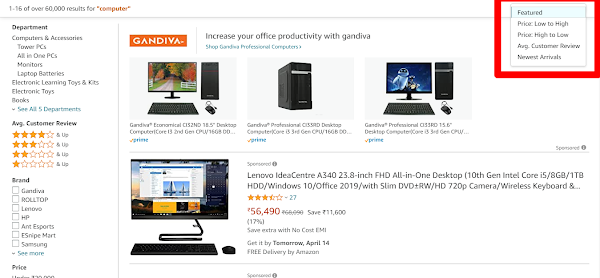
When you search for a product on Amazon or Flipkart, the default listing order is Relevance or Featured — which means the platform decides what appears at the top based on a mix of sales history, listing quality, and paid placement. That default isn’t always what’s best for you.
Every platform lets you re-sort results by:
- Price: Low to High — find the cheapest viable option without scrolling endlessly
- Price: High to Low — surface premium options immediately
- Average Customer Review — the most underused sort option. This surfaces the most trusted products by actual buyers, not the most promoted
- Newest Arrivals — useful when you want the latest model or version
Pro tip: Sort by customer review rating the next time you search for something. You’ll regularly find highly-rated products that the default algorithm has buried on page three in favour of sponsored listings.
2. Sponsored Products — What That Label Actually Means
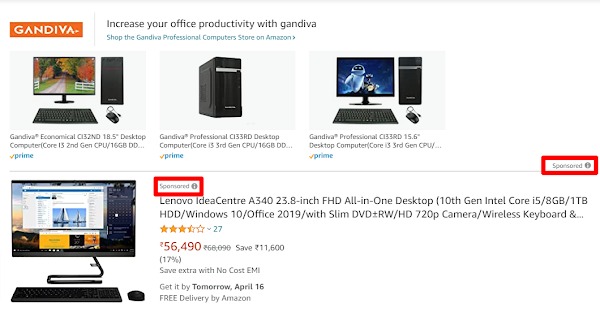
Notice a small “Sponsored” label on certain product listings? This is the ecommerce equivalent of a Google Ad — sellers pay to have their products placed at the top of specific search results, regardless of whether they’re the most relevant or best-rated match for your query.
Sponsored products aren’t automatically bad. Some are excellent. But the key word is paid — the top result isn’t necessarily the best product. It’s the one that paid the most to appear there.
The practical implication: don’t default to buying the first result. Scroll past the sponsored listings, use sorting and filters, and compare a few options. A quick scan of the customer reviews usually tells you everything you need to know about whether a product deserves its prominence.
3. Filters — The Fastest Way to Find What You Actually Want
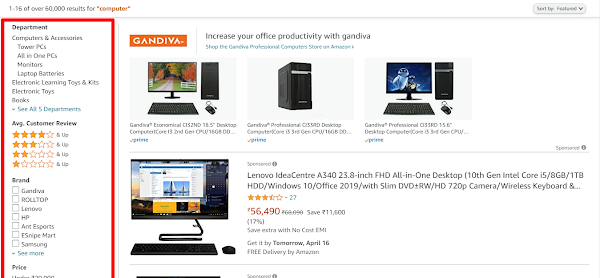
Most shoppers scroll through page after page of search results looking for something that matches their requirements. There’s a much faster approach — the filter panel, usually on the left side of any search results page.
Filters let you instantly narrow results by:
- Brand — only see products from specific brands you want to compare
- Price range — set a budget ceiling and eliminate everything above it immediately
- Customer rating — filter to only show products rated 4 stars and above
- Delivery options — Prime/Fulfilled eligibility, delivery speed
- Category-specific attributes — RAM, storage, colour, material, size, and dozens of other specifications depending on product type
A well-applied set of filters can cut a 200-product search page down to 12 genuinely relevant options in under 30 seconds. If you’re not using them, you’re doing significant unnecessary work every time you shop.
4. Renewed and Refurbished Products — Undervalued, Underused
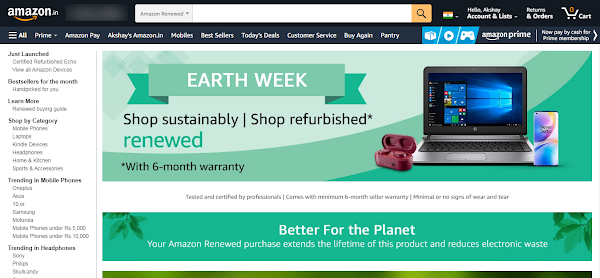
Most shoppers scroll past Renewed or Refurbished listings without a second glance. Worth understanding what these actually mean before dismissing them.
Refurbished products are items returned to the seller — because of a reported defect, a change of mind, or cosmetic damage — then inspected, repaired where needed, and re-listed. They’re not brand new, but they’ve been tested and certified to function correctly, and they’re typically sold at a meaningful discount.
For high-value purchases like smartphones, laptops, and headphones, a certified refurbished product from a reputable seller can represent excellent value — often 20–40% cheaper than new. Amazon handles this through its Amazon Renewed programme; Flipkart has a dedicated portal called 2Gud.
What to check before buying refurbished: the seller’s refurbishment warranty (minimum 90 days from a reputable seller), the refurbishment grade (Like New, Good, Acceptable — each describes cosmetic and functional condition), and the return policy. These aren’t shady deals. They’re second-life electronics that most buyers reject based on the label alone.
5. Fulfilled by Amazon and Flipkart Assured — Why These Badges Matter
On Amazon, the Fulfilled by Amazon badge means Amazon itself — not a third-party seller — is handling storage, packing, and shipping. On Flipkart, the equivalent is Flipkart Assured.
Why these badges are worth looking for:
- Consistent fulfilment quality — warehouse and logistics standards are tightly controlled by the platform rather than varying by individual seller
- Faster, more reliable delivery — particularly relevant for time-sensitive purchases
- Smoother returns and refunds — handled directly through the platform rather than requiring negotiation with third-party sellers
- Prime eligibility — Fulfilled products count towards free delivery thresholds on Amazon Prime accounts
When comparing two similar products at similar prices, the Fulfilled/Assured badge is a meaningful tiebreaker — particularly for anything where delivery reliability or easy returns matter.
6. Flash Sales — How They Actually Work (And How to Compete)
If you’ve ever watched a flash sale item go out of stock before you could add it to cart — you’re probably not too slow. You’re competing against tools that aren’t.
A portion of flash sale stock gets pre-booked by users running browser extensions that detect product availability the moment it goes live and complete checkout faster than any human can manually. By the time you’re on the product page, automated buyers have already claimed units.
What you can do to compete without automation:
- Add to wishlist and cart before the sale starts — some platforms allow faster payment flow if the item is already in your cart
- Save your payment method and delivery address in advance — checkout that takes 10 seconds beats one that takes 90 seconds every time
- Use the platform’s notification or reminder feature — get alerted the moment the sale begins rather than monitoring manually
- Have the product page open and refreshed right as the sale goes live — don’t rely on navigating there after it starts
Frequently Asked Questions
Q: What does Sponsored mean on Amazon and Flipkart?
A: Sponsored products are paid placements — sellers pay the platform to appear at the top of specific search results regardless of organic ranking. A sponsored product is not necessarily the best or most relevant result. Always compare sponsored results with organic ones before purchasing.
Q: Is Amazon Renewed worth buying in India?
A: Yes, for high-value electronics. Amazon Renewed products are typically 20–40% cheaper than new, have been inspected and repaired where needed, and come with at least a 90-day warranty from qualifying sellers. Check the refurbishment grade (Like New, Good, Acceptable) before purchasing — this describes both cosmetic and functional condition.
Q: What is Fulfilled by Amazon (FBA)?
A: Fulfilled by Amazon means Amazon itself stores, packs, and ships the product — not a third-party seller. This typically means faster delivery, more consistent packaging quality, and easier returns handled through Amazon’s system.
Q: How do I win flash sales on Amazon and Flipkart?
A: Add the product to your cart before the sale starts. Save your payment details and delivery address in advance. Use the platform’s reminder feature. Have the product page open right as the sale goes live. Some buyers use browser automation tools that complete checkout faster than manual buyers — understanding this helps set realistic expectations about very limited stock items.
Q: How do filters work on Amazon and Flipkart?
A: The filter panel (usually on the left side of any search results page) lets you narrow results by brand, price range, customer rating, delivery speed, and category-specific attributes. Setting a minimum 4-star rating filter and a budget range instantly reduces a 200-product page to 10–15 relevant options.
Conclusion
Online shopping platforms are more powerful than most users give them credit for. Sorting by customer rating, filtering aggressively, understanding what Sponsored and Fulfilled actually mean, considering refurbished options, and knowing how flash sales work — these aren’t advanced techniques. They’re features the platform assumes you already know.
Now you do. Shop smarter.
Selling on Amazon or Flipkart as an Indian startup?
Everything in this post describes how buyers navigate and evaluate your listings — from the other side. The sorting algorithm determines whether your product appears on page one or page five. Sponsored placements are the primary lever for visibility when you’re new. The Fulfilled/Assured badge directly increases your conversion rate. Flash sale participation can generate months of revenue in days.
Understanding how these features work as a buyer is the first step. Knowing how to optimise for them as a seller is what separates Indian startups that win on marketplaces from those that list products and wonder why nothing sells. We’ve put together a practical guide on marketplace listing optimisation for Indian founders selling on Amazon and Flipkart — no agency required.
Related Articles
Read next

How to perform Google Image Search
You’ve probably used Google Image Search dozens of times without knowing half of what it can do. Most people treat […]
Read More
What is Textra? A Complete Guide to Textra App
Your default SMS app works. But “works” is a low bar. Textra SMS is what happens when a developer spends […]
Read More
How to Resize an Image in GIMP
Got an image that’s too large to upload, or too small to print properly? Whether you’re prepping visuals for a […]
Read More